ShareThis

Monday, December 5, 2011

How to use and configure Dynamics CRM Mobile App

The Windows Marketplace has released Dynamics CRM Mobile App that can help users receive latest notifications on their mobile phones.


Below are the steps to be followed to configure and start using this app from your mobile phone:
  1. Download Dynamics CRM App from the Windows Marketplace. Install the application and launch it.
  2. Specify user name and password to connect to your CRM Online instance. This is same as the one that you use to connect from web client or outlook client to the CRM Online instance.
  3. Once the configuration is done, a window with ‘Success’ message is displayed.
  4. To enable connection to IFD (Internet Facing Domain) environment, toggle the switch “Microsoft Dynamics CRM Online” which then becomes “Custom”.
  5. Enter your server URL and home realm URL (if any). Contact your administrator for these details, if you are unsure. Ensure you choose the right organization if there is more than one. 
  6. The administrator must enable Activity Feeds for your organization to get the real time posts. In order to take advantage of this app, your mobile needs to run UR5 or greater version. 
Apart from getting real time notifications, the below activities can be done from the mobile phone once the configuration is complete:
  • User can view both auto and user posts
  • User can make or refresh a post or comment
  • User can delete a post or comment if they have proper permissions
  • User can move from one post to another by using right and left arrows
  • By tapping on blue text on the form, user can navigate between entities
  • User can view CRM entities such as accounts, contacts, leads etc.
  • User can search and view a record
  • User can also reconfigure the app for a different organization
  • User can launch email, phone and Bing maps tasks from record form
Apart from the above, with the help of system administrator, user can enable specific entities for mobile and choose the right columns for every entity’s view.

Also, when you set up personal views on your web or outlook client, it will automatically get downloaded to your phone after 24 hours. Additionally, if you make any metadata changes to the server, they will be reflected on your phone as well. Read more. 

Cygnet Infotech offers professional services in developing mobility solutions for business applications. 

Friday, December 2, 2011

Windows Mobile 7 bags OS of the year 2011

The news is certainly all over the place - Know Your Mobile Awards of 2011 has recognized and rewarded the Windows Mobile phone with Operating System of the year 2011 award. Despite the fact that Windows phone is still not as popular as the iOS of Apple or Google’s Android, this award sure seems to have given Microsoft some leverage with respect to mobile phones.

The metro user interface incorporated by Microsoft was the main focus during the presentation of the award. The fact that the interface does not look like any of its competitor’s interfaces has worked in its favor. Below are the three highlights with respect to Metro interface.
  • Smart updating tiles
  • Tablet optimized interface
  • Flexible apps


The completely customizable startup screen has scored among the customers leading to the success of this phone. Some other highlighted features were:
  • XBOX Live
  • Bing
  • Windows Live
  • Office Integration
  • Zune
The judge panel seemed to have well-justified reason for choosing the Windows Phone OS. Below are some of the comments given by the judges with respect to the winner this year.
“It has the most potential, with a unique interface and a rapidly growing apps selection. It has a great looking UI and doesn’t look like Android or iOS.”
“A massive move from the previous OS. Huge growth in apps and the system looks heaps better than the competition.”
“Innovative interface, with more success to come.”
“A refreshing OS that doesn’t try and copy other operating systems. Has attracted a large number of developers too.”
Thus, the OS has concentrated on the user needs first by getting rid of useless uninformative icons and providing them with rich Internet experiences and useful as well as smarter apps on the mobile phone. However, whether the same can be said of the interface when implemented on desktop is still under speculation.
For those of you who are curious to know - Blackberry 7 and Samsung Bada were awarded with runner up prizes in this category.
Cygnet offers mobile application development services to assist companies to introduce mobility solutions for their business.

Thursday, December 1, 2011

OptEyeCheck – an iPhone App for Checking Your Vision

OptEyeCheck is an iPhone application which offers a convenient way for checking your vision. By placing your iPhone one foot away from your eyes, you are able to complete four tests: Near Vision (for Myopia), Color Vision Deficiency, Amsler Grid Test and Contrast Sensitivity Test. The results of the tests are stored on your iPhone so that you may share them with your eye doctor.


Near Vision Check (Myopia)
Myopia may be the cause of blurred vision. This check provides you with alphabets in the upper panel to select from the options given below the panel. The size of the letters becomes smaller with each level you pass, and the test continues until your answer does not match the required answer. Your result is then displayed for you.

Color Vision Deficiency Check (Ishihara Color Test)
Color Vision Deficiency is the lack of perceptual sensitivity to certain colors. A series of pictures of colored spots with an embedded number is presented. When you identify the number and select the correct answer from the options presented, a result card is generated showing how your answer compares to a person with normal vision. If you experience “color-blindness” this is an excellent way to check for sure.


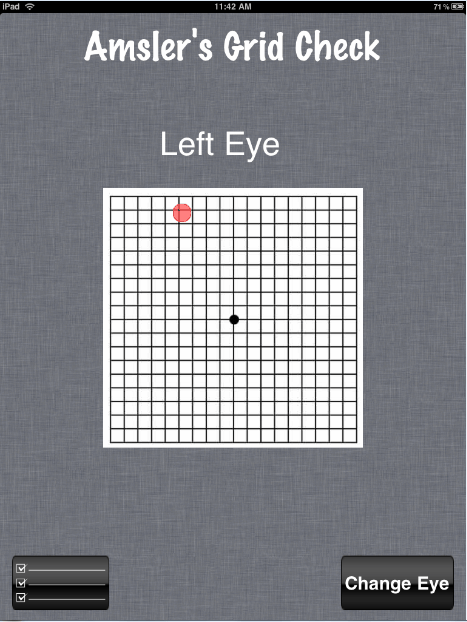
Amsler Grid Check
Designed to detect any kind of visual disturbance which may be caused by changes in the retina, optic nerve or the visual pathway to the brain, this test has you look at the grid with each eye concentrating on the small dot at the center of the grid. If you see any wavy lines or if some lines are missing, you mark the grid. The result of each eye is stored in your iPhone and can be used by your doctor to diagnose the actual location of a problem. The Amsler Grid Check helps diagnose macular disease in your eyes. If macular degeneration is in your family, this will be an important check for you.


Contrast Sensitivity Check
The Contrast Sensitivity test will determine how well your eyes adjust to low light and how well you can distinguish objects when they are in similarly colored or shaded backgrounds. This is a special way to measure your visual acuity. You are presented with a high contrast eye chart which has a black letter slowly merging into the white background on each level of the test. The check continues until you give two consecutive wrong answers. A chart showing how far you completed the test successfully and where exactly the answer went wrong is then stored.


Consult Your Doctor
Once you have completed all four of the tests, your iPhone will have four test results to share with your doctor.

Rated 4+, the app is available from iTunes for $0.99. Developed by Cygnet Infotech LLC and released in 2011, this app is also compatible with iPod touch and iPad; it requires iOS 3.0 or later. If your eyes are “bothering” you, perhaps you might find the reason in one of these tests. Check it out OptEyeCheck

Wednesday, November 30, 2011

Delivering Business Critical Solutions with SharePoint 2010

Access of business critical data and management of processes across an organization is no longer time consuming and inefficient.

With SharePoint 2010 delivering business critical solutions, the storage of business data is secured at the same time access to this data has been made easier. Be it customer related information or business critical data, business connectivity services of SharePoint 2010 makes is possible for the employees to view this data with no/minimal support from the IT resources.

The simple fact that not all the employees are trained to interact with the back end systems has so far hindered operational efficiency during critical times. With SharePoint 2010 however, the backend data can be brought forth and displayed to the users without having to rely on IT support personnel.

The user-friendly interface enables the employees of an organization to operate quickly and effectively when it comes to looking for important information. According to the permissions granted, business processes and critical data can thus be accessed more efficiently by employees of the organization.

Download the whitepaper - Delivering Business-Critical Solutions with SharePoint 2010

How does SharePoint help in information access?

By connecting the Line Of Business (LOB) applications to SharePoint 2010, the information buried within the LOB systems can now easily be presented to users through the familiar Microsoft Office or SharePoint user interface. This has been made possible through business connectivity services present in SharePoint 2010. The business data is thus displayed to users on more familiar user interfaces such as Microsoft Outlook, Word and Excel thus making it easier for them to read or edit LOB information.

Also, by connecting external systems with SharePoint 2010, business critical solutions including IT managed solutions and advanced user and information worker solutions that are crucial to an organization can be built on SharePoint itself.

Cygnet Infotech assists IT companies and independent software vendors to develop portals, sites and business information access solutions using SharePoint 2010. Having earned a Microsoft silver competency in portals and collaboration, Cygnet has the experience and expertise to develop and implement solutions on SharePoint. Read more about Cygnet’s SharePoint Case Studies.

Monday, November 28, 2011

Developer Tools and SaaS Capabilities introduced for Dynamics CRM

In order to provide more advanced features with respect to development of custom components in Dynamics CRM, Microsoft has released new tools. Till now, the developers have had difficulties in developing code-based solutions such as plug-ins, custom workflows as well as UI web resources like JavaScript. The developers have had to update such solutions with latest available version of these components from time to time. 
With the new developer toolkit, developers have been granted an easier mechanism to code the additional components such as a new form or an extension to an existing schema. The recently released toolkit for Microsoft Dynamics CRM: 
  
  • Provides integration of Dynamics CRM with Visual Studio
  • Accelerates development of custom code components
  • Enables developers to write the code from within Visual Studio
  • Enables developers to use Visual Studio 2010 templates to develop custom component projects in Dynamics CRM
  • Supports automatic deployment of code to CRM service in the cloud
  • Supports automatic deployment of code to in-premise environment
  • Supports complete development, editing and deletion of CRM Plugins and workflows
  • Supports both XAML and customer workflow activities
  • Installs browser module that can be used to browse various artifacts present within Dynamics CRM instance
The package can be embedded with Visual Studio 2010 development environment that enables to streamline the development of custom solution components. A familiar development studio is provided to those who are already well acquainted with Dynamics CRM development. Also, this toolkit can guide the developers who are naïve to the CRM extensibility but are well versed with VS and .NET to start coding within ten minutes. With this toolkit, the Silverlight applications can also be created, updated, deployed and deleted.
Apart from this toolkit, the below tools have also been released by Microsoft to aid developers: 
  
  1. Plug-in profiler which can make troubleshooting plug-ins an easier and quicker job for the developers
  2. Entity Metadata Browser which can be used by developers to view the entities and their properties in the system

Friday, November 25, 2011

Testing Whiz Blog Launched

Cygnet is glad to announce the launch of its public blog on software testing. You can visit it at http://blog.testing-whiz.com


The purpose of the blog is to share concepts and trends in the area of software testing - types of testing, testing methodology, automated testing, testing frameworks, and other topics.


Wednesday, November 23, 2011

RAD Studio XE2 – A Game Changer

The fact that applications developed for Mac OS cannot be run on Windows and vice versa has created a big divide in the operating systems arena. Although, it has been possible to run Windows applications on Mac computers through various workarounds, it has never been easy for people to run applications on both Windows and Mac.

Here is one company that is trying to change that. Embarcadero has released in Sept 2011, a new development platform RAD Studio XE2 which will allow developers to build applications for Windows, Mac and iPhone / iPad at the same time. That news is definitely worth raising your eyebrows for.

RAD Studio XE2 from Embarcadero


RAD Studio XE2 is an application development suite for building applications for Windows, Mac, mobile, .NET, PHP and the Web. It will enable developers to build cross platform native applications up to 5 times faster. Applications are 100% CPU and GPU native and developers can build GPU-powered HD and 3D UIs using the new FireMonkey™ platform. RAD

RAD Studio XE2 comprises of Delphi XE2, C++ Builder XE2, Prism XE2 and RADPHP XE2. For a PHP developer, RADPHP XE2 enables development of applications for iPhone, iPad and Android with just PHP knowledge. RADPHP XE2 also provides a visual PHP IDE for rapidly developing web applications using drag and drop components. Delphi XE2 also supports development of 64-bit Windows applications.

With RAD Studio XE2, rapid application development will become even more rapid.

Cygnet has already started offering services on this new platform. Since it has several years’ experience in development with Delphi technology, Cygnet is in a good position to extend its expertise to RAD Studio XE2 based development and offer its clients even faster development times and ability to develop cross platform native applications.